

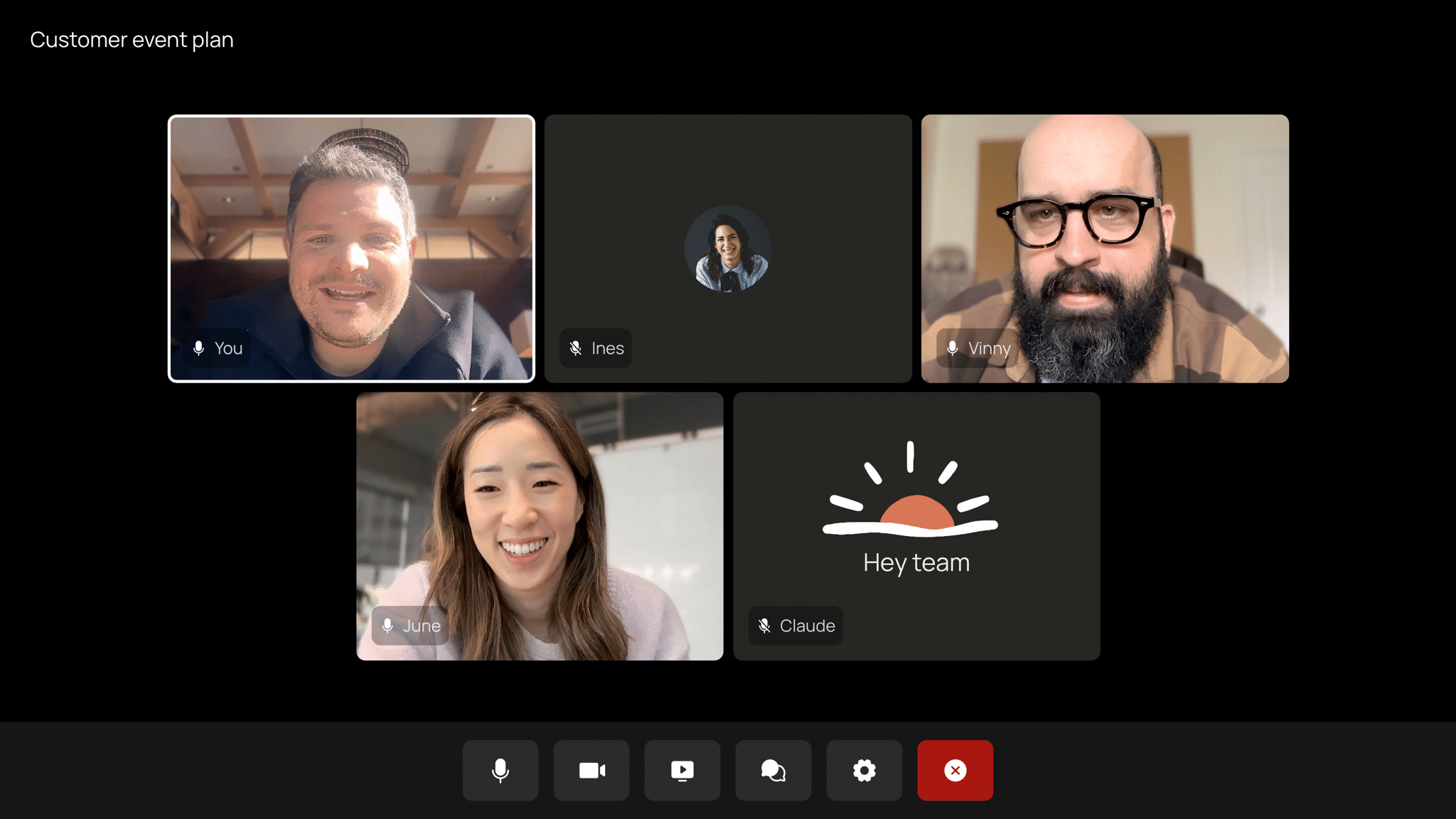
Claude Meetings beta introduces Claude as a visible participant in live video calls. It can follow the conversation, answer questions and begin producing work while a meeting is still underway.[1] For business teams, this represents a shift from using Claude before or after a call to collaborating with it in real time.
What Claude Meetings beta adds
Once added to a supported meeting, Claude appears in the participant list and posts a notice in the meeting chat. Team members can address it aloud or send questions through chat. Claude answers in writing by default and, with the appropriate permission, can use tools connected by individual participants.[1]
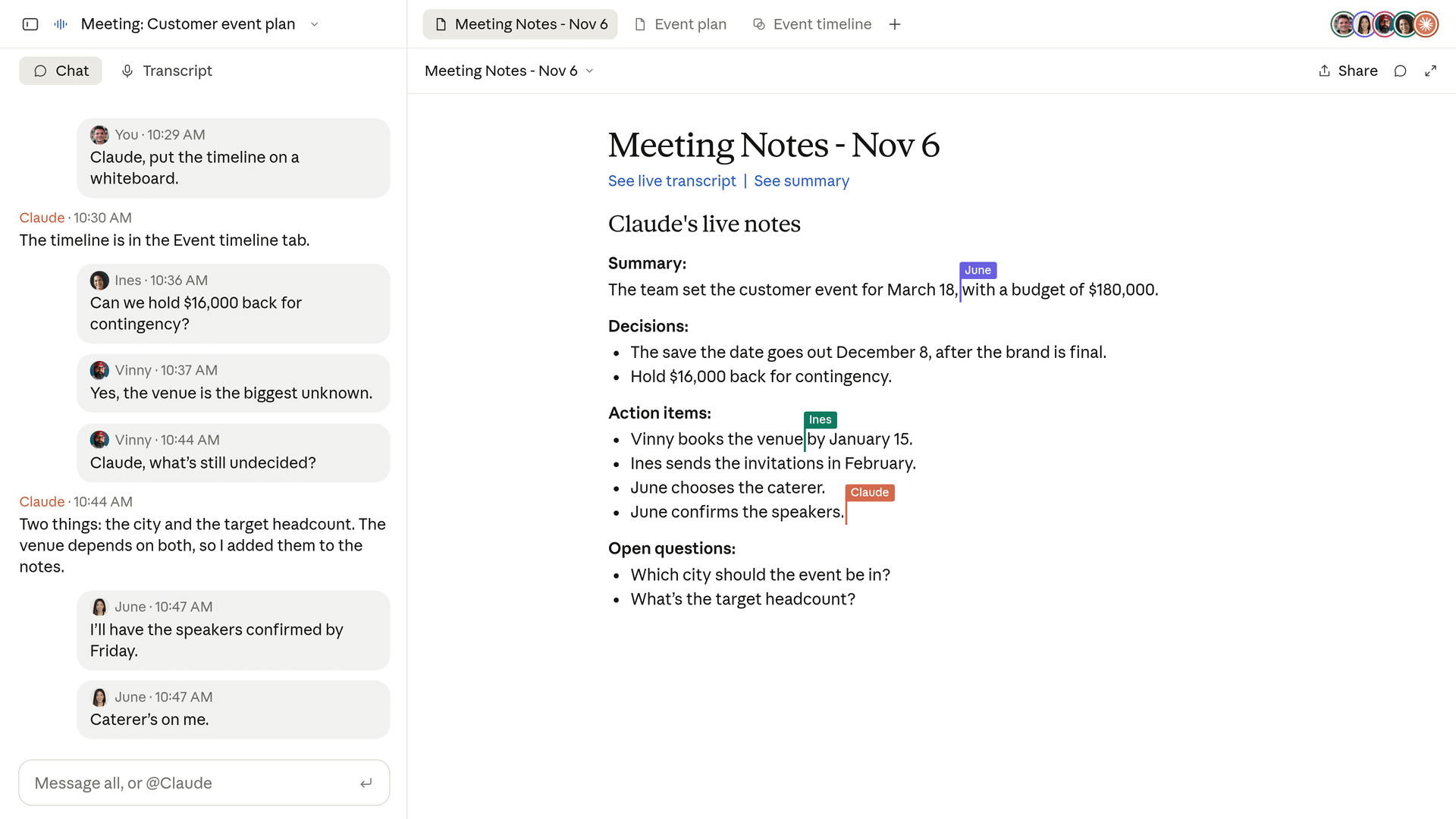
The feature goes beyond recording a discussion. Claude can create documents, whiteboards and other artifacts as the conversation develops. People included on the invitation can refine those materials while the meeting continues. Claude can also produce notes and action items, reducing the need for one attendee to document the call manually.[1]
This makes the new release best understood as an in-meeting working capability rather than a conventional transcription tool. The distinction matters: Claude is designed to turn decisions and ideas into editable outputs during the discussion, not simply summarize them afterward.
From conversation to working material
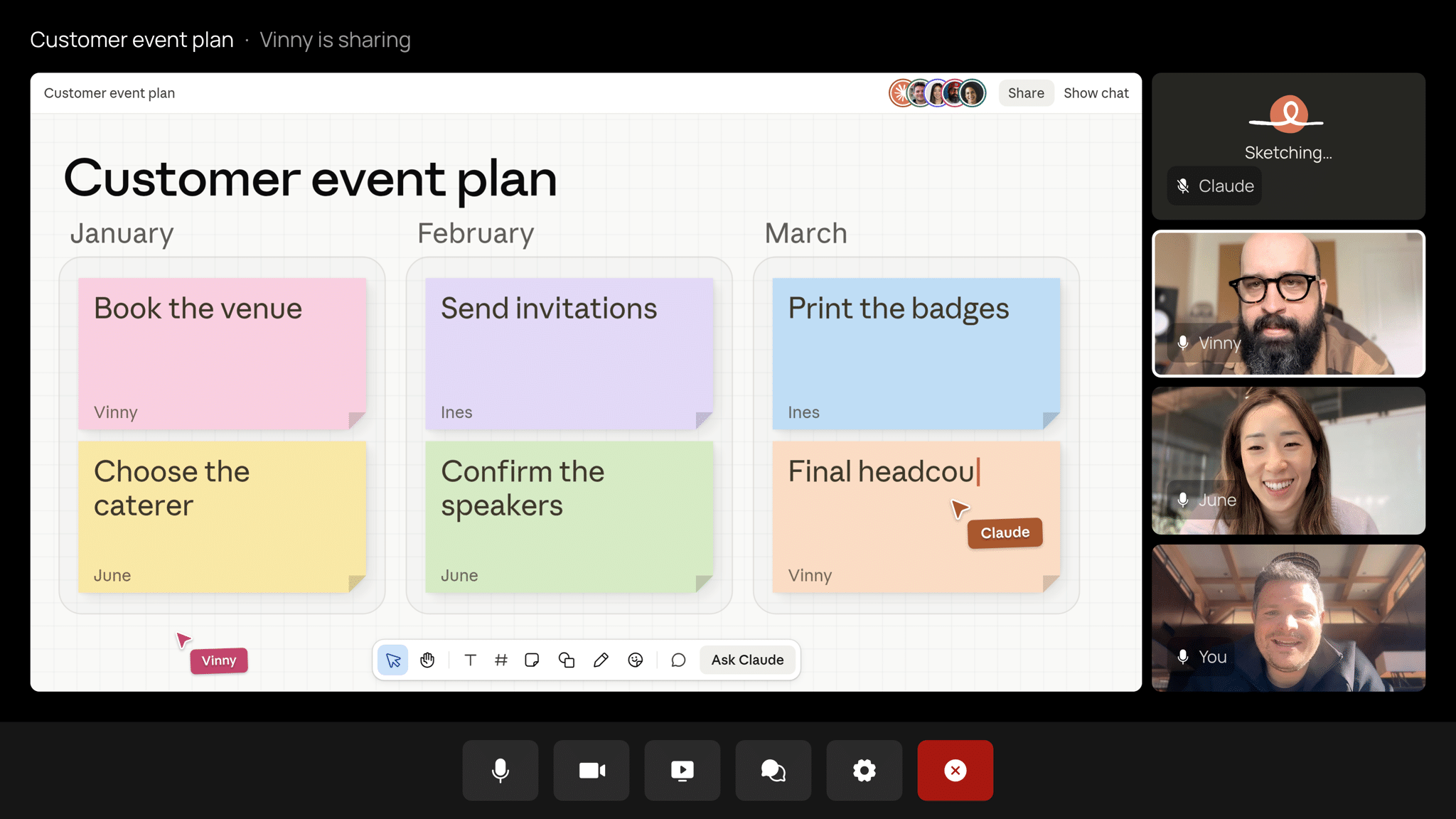
Anthropic illustrates the experience with a customer-event planning meeting. A participant can ask Claude to start a planning document, and Claude will write up what has already been discussed. Invited teammates can edit that plan without waiting for the call to finish.[1]
If the conversation moves to budget, a participant can ask Claude to retrieve the previous event’s cost. Claude requests approval before accessing the connected tool, then posts the result in the meeting chat and compares it with the current plan. When the team turns to scheduling, it can ask Claude to place the timeline on a whiteboard for further collaboration.[1]
Before the call ends, the team can request a recap. The resulting notes, action items, plan and whiteboard remain available from the meeting’s page in claude.ai. Participants can later return to meetings they attended and ask Claude questions about them.[1]
Why working during the meeting matters
Meetings frequently separate discussion from execution. People agree on a direction during the call, but the plan, recap or task list is assembled later. Claude Meetings brings those stages closer together by creating shared material while the relevant context is still being discussed.
That approach can also make review more immediate. When Claude drafts a plan during the call, attendees can correct details, clarify ownership and refine language in the moment. The result is not automatically final or authoritative; it is a working artifact that the team can inspect and improve.
For business leaders, the most important capability is therefore not transcription alone. It is the combination of conversation awareness, permission-based tool access and live artifact creation. Used carefully, that combination can help a meeting finish with visible outputs rather than only verbal agreement.
Meeting pages preserve the context
Claude creates a separate page in claude.ai for each meeting. The page contains the notes, transcript and materials produced during the call. People from the organization who were on the invitation can view the page and edit Claude’s work, while the page can also be shared with other people in the same organization.[1]
This persistent record gives teams a place to revisit both the discussion and its outputs. Claude can also be added to a future meeting through the calendar in claude.ai.[1] Anthropic says it is working with Gong, Attention, Granola, Fireflies.ai, Otter and Plaud so that meeting transcripts can eventually be sent to tools teams already use.[1]
Privacy and consent are central to deployment
When Claude joins a call, it is visible as a participant and posts a notice in the chat. It saves a transcript, a summary and descriptions of shared screens, but it does not save the meeting audio.[1] Anthropic advises users to confirm that everyone on the call is comfortable with transcription before adding Claude or enabling automatic joining.[1]
Connected-tool access is based on the permission of the individual whose tool Claude would use. Claude asks for permission the first time, and approval then applies to future requests. During the beta, when a request is made aloud, Claude asks each time for confirmation of who is speaking. Any answer it posts in the meeting chat is visible to everyone in the call.[1]
These controls make advance communication important. Organizations should define when Claude may attend, how participants will be informed and who is responsible for checking generated notes and artifacts. Teams should also remember that written responses posted in a shared meeting chat have the same audience as that chat.
External meetings follow plan-specific rules
On Team plans, Claude can join calls containing external guests by default, although an administrator can disable that behavior. On Enterprise plans, Claude does not join meetings with outside participants unless an administrator permits it. If an external participant joins partway through an Enterprise meeting, Claude leaves unless the relevant setting has been enabled.[1]
For permitted calls involving guests, Claude posts its notice in the meeting chat but does not respond there. What guests say is still included in the notes and transcript.[1] Administrators evaluating the beta should account for these distinctions when setting policies for customer, supplier or partner meetings.
Availability and beta limitations
Claude Meetings is beginning its beta rollout on Claude Team and Enterprise plans. Google Meet is the currently supported video conferencing platform, with support for other platforms planned.[1]
On Team plans, the ability to invite Claude is enabled by default and can be turned off by an administrator. On Enterprise plans, an administrator must activate it for all or part of the organization. Claude can join when a user adds it directly or when automatic joining is enabled.[1]
The beta is not available to some organizations, including those using zero data retention, a HIPAA-ready configuration or customer-managed encryption keys.[1] These exclusions are particularly relevant for teams operating under strict data-handling requirements.
How beta usage is charged
During the beta, notes, transcripts and Claude’s in-call answers are free for Team and Enterprise plans. An answer that uses a connected tool counts toward the organization’s plan usage. Documents, whiteboards and other artifacts produced during calls are free through February 10, 2027.[1]
Organizations running a trial should distinguish between the meeting features included during the beta and requests that invoke connected tools. That separation will make it easier to assess both adoption and usage.
A practical evaluation plan
A controlled pilot is the clearest way to evaluate Claude Meetings. Start with internal, repeatable meetings where participants understand the transcription process and can review Claude’s outputs.
- Select a meeting type. Choose a recurring planning, project or operational call with a clear expected output.
- Set participation rules. Decide whether Claude may auto-join, how attendees will be notified and whether meetings with external guests are eligible.
- Define the output. Ask Claude for a specific artifact, such as a working plan, recap or action list.
- Review before distribution. Assign a participant to verify names, decisions, responsibilities and dates.
- Assess the workflow. Determine whether producing materials during the call improves clarity and reduces follow-up work.
The aim should not be to remove human ownership. A stronger operating model uses Claude to prepare and organize material while designated participants remain accountable for approval, interpretation and action.
Conclusion: move from notes to live collaboration
Claude Meetings beta expands Claude from a tool used around meetings into a participant that can contribute during them. Its combination of written answers, permission-based retrieval, live document creation and persistent meeting pages gives teams a new way to turn discussion into working material.[1]
The next step is to review the privacy and administration settings, choose a suitable internal meeting and follow Anthropic’s Claude Meetings announcement and setup guidance before beginning a limited pilot.
Sources

Written by
Ganesh Babu Vasantha RajanContent Writer
Ganesh Babu Vasantha Rajan is a contributor at AgilizTech....
View all articles